Staff Management
Staff Management (Premium)
Staff Management lets you bring other people onto your support team — agents who can log in and work tickets under their own account — without handing out full WordPress Administrator access. An agent gets exactly enough access to do the job (view and reply to tickets) and nothing more; they can't touch Settings, other plugins, or anything else in wp-admin.
This is different from just creating a WordPress user with an existing role: Supportivo ships its own Support Agent role, built specifically for this — it grants no admin capabilities at all beyond what Supportivo itself checks for.
Turn it on from the Setup Wizard's Features step (or Settings afterward) — see Getting Started for the wizard walkthrough. Once enabled, a new Staff page appears under the Supportivo menu in wp-admin.
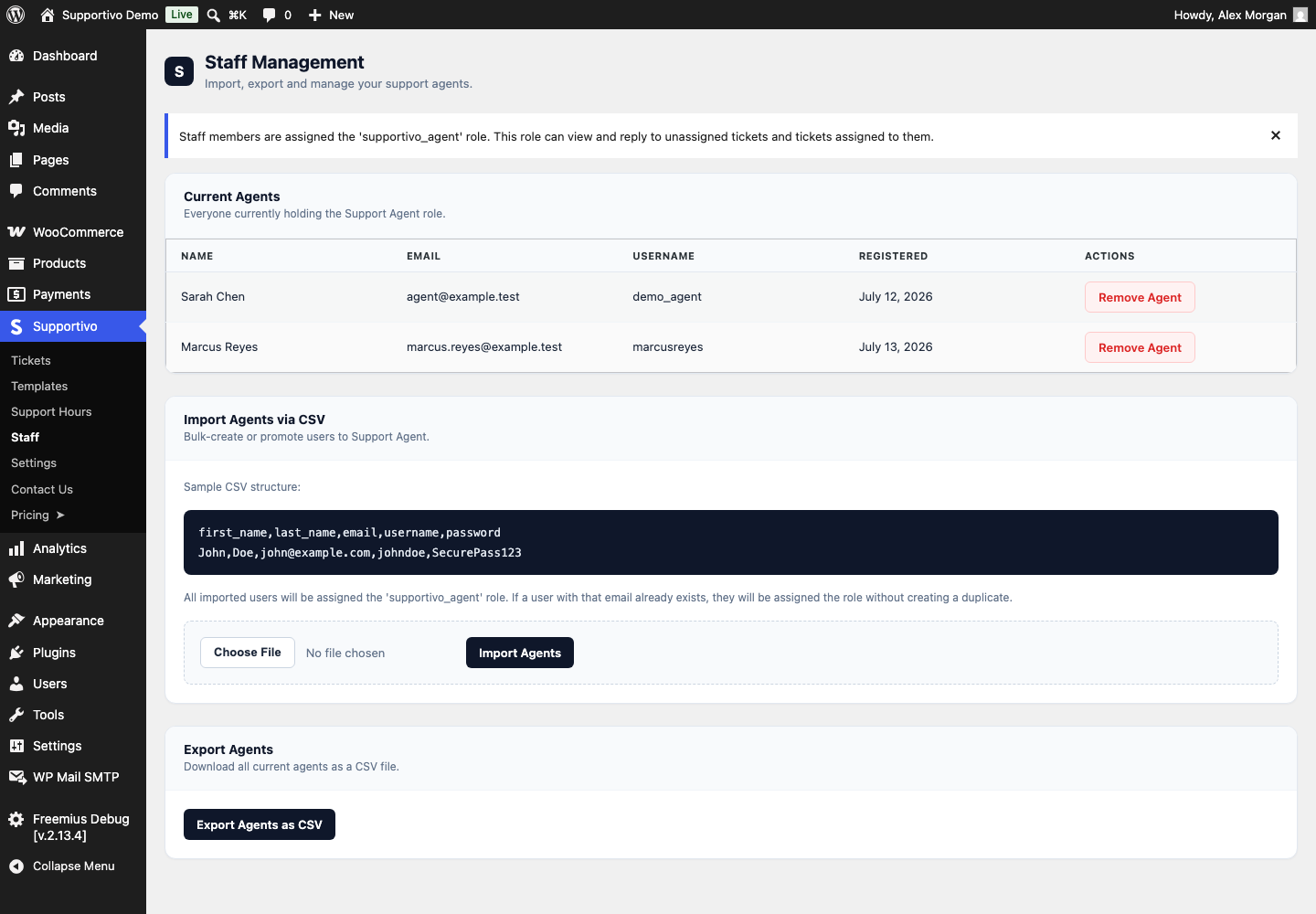
Adding an agent
There's no separate "add one agent" button — Supportivo's own UI is built entirely around CSV import, which works just as well for one person as for fifty. To add a single agent, upload a CSV with just one data row:
first_name,last_name,email,username,password
John,Doe,[email protected],johndoe,SecurePass123
If the email already matches an existing WordPress user, that user simply gets the Support Agent role added on top of whatever they already had — their username, email, and password are left untouched, only their name fields get refreshed from the CSV. If the email is new, a brand-new account is created with only the Support Agent role (not your site's default new-user role), using the password from the CSV — or a random one, if you leave that column blank. (See the Import Agents via CSV card in the screenshot above for exactly what this looks like.)
Alternative — promoting an existing user directly: Support Agent is a real, standard WordPress role, so you can also skip the CSV entirely and assign it directly from Users → All Users → Edit (or Users → Add New) in wp-admin, the same way you'd assign any other role.
Bulk export
Click Export Agents as CSV on the same Staff page to download every current agent — first name, last name, email, username, and registration date — as a CSV file. Handy for backing up your team list or moving agents to another site.
What an agent can do
Once someone has the Support Agent role, they log in through the same frontend portal your clients use (not wp-admin) and can see and reply to every ticket across every client — not just their own. The full breakdown of what staff see differently from clients (and from Administrators) is covered in Ticket Management → What Staff/Agents see; it isn't repeated here.
Removing an agent
Click Remove Agent next to their name on the Staff page (visible in the Current Agents table in the screenshot above). Your browser will ask you to confirm before anything happens. This only removes the Support Agent role — it does not delete their WordPress user account, so if they had other roles or need access restored later, nothing about their account itself is lost.
How the permission system decides who's "staff"
Behind the scenes, Supportivo treats someone as staff if either of these is true:
- They hold the Support Agent role, or
- They hold a role in an internal "staff roles" list, which defaults to just Administrator.
In practice, this means Administrators automatically get full staff access to tickets without needing the Support Agent role at all — the Support Agent role exists specifically for people who should have only that access, and nothing else.